.svg)

MCP in Two Minutes
Model Context Protocol is an open standard introduced by Anthropic in November 2024 and donated to the Linux Foundation’s Agentic AI Foundation in December 2025. It defines a universal way for AI applications (clients) to communicate with external data sources and tools (servers) over JSON-RPC 2.0.
The architecture is straightforward. A host is the AI application you interact with (Claude Code, Cursor, VS Code with Copilot, Codex, Windsurf, Zed, or any custom tool). Inside the host, an MCP client manages the connection to one or more MCP servers. Each server exposes capabilities through three primitives:
- Resources: read-only data the AI can pull into context like files, database records, API responses, documentation.
- Tools: executable functions the AI can invoke like running queries, creating files, triggering deployments.
- Prompts: reusable instruction templates for common tasks, like code review workflows, commit message generation, test scaffolding.
Before MCP, every AI tool had its own integration approach. Connecting an AI assistant to GitHub, Jira, a database, and your codebase required four separate custom integrations per tool. With MCP, you write a server once and every compatible client can consume it. The protocol turned what was an N×M integration problem into an N+M one.
By early 2026, MCP has been adopted by every major AI coding platform: Claude Code, Cursor, VS Code Copilot, Codex, Windsurf, Zed, Continue.dev, Cline, and Goose. OpenAI officially adopted the standard in March 2025. Google DeepMind followed. The protocol is now backed by SDKs in TypeScript, Python, C#, and Java.
Why MCP Matters More for Code Than for Data
Most MCP coverage focuses on connecting agents to databases, CRMs, and communication tools. That’s useful, but it undersells the protocol’s most transformative application: codebase context delivery.
The challenge is unique. When an AI agent queries a database via MCP, it gets structured data back (rows, columns, types). The query result is self-contained. When an agent queries a codebase, what it gets back shapes everything it does next: every line of code it writes, every refactoring suggestion it makes, every test it generates.
A bad database query wastes a few seconds. Bad codebase context produces hallucinated imports, broken call chains, patterns that contradict your architecture, and “fixes” that break other parts of the system. The stakes are fundamentally different.
This is why the type of codebase MCP server matters enormously. Retrieving files and retrieving intelligence are not the same thing.
The Spectrum of Codebase MCP Servers
Not all code MCP servers deliver the same depth of context. The ecosystem has stratified into three distinct categories, each solving a different level of the problem.
Category 1: File Search Servers
The simplest category exposes basic file operations: read files, search text, list directories, grep for patterns. The Anthropic reference filesystem MCP server falls into this category, as do the built-in file tools in Claude Code and Cursor.
These servers mirror what a developer does when exploring an unfamiliar codebase: open the folder, look at the structure, search for a function name. They’re fast, deterministic, and require zero setup. But they don’t understand code — they treat source files as text documents.
Category 2: Semantic Code Search Servers
The second category adds intelligence to retrieval. These servers index your codebase using embeddings or AST analysis and support semantic queries: “find code related to authentication” or “show me the payment processing flow.”
Code Pathfinder is a strong example. It builds a comprehensive call graph through multi-pass AST analysis and exposes it via MCP, enabling agents to query callers, trace dependencies, and perform dataflow analysis. GitNexus uses Tree-sitter to build a knowledge graph with Graph RAG, serving structural context to Claude Code and Cursor. KiroGraph provides a 100% local semantic graph with hybrid search. Nella MCP offers AST-aware chunking with assumption validation and dependency tracking.
These tools represent a significant upgrade over file search. The agent receives structurally aware results (actual function calls, real dependency chains, verified import relationships) rather than text fragments that happen to contain matching keywords.
Category 3: Code Intelligence Servers
The third category goes beyond retrieval entirely. Instead of returning raw code or search results, code intelligence MCP servers deliver pre-analyzed specifications: component descriptions, architecture summaries, business rule documentation, and relationship maps.
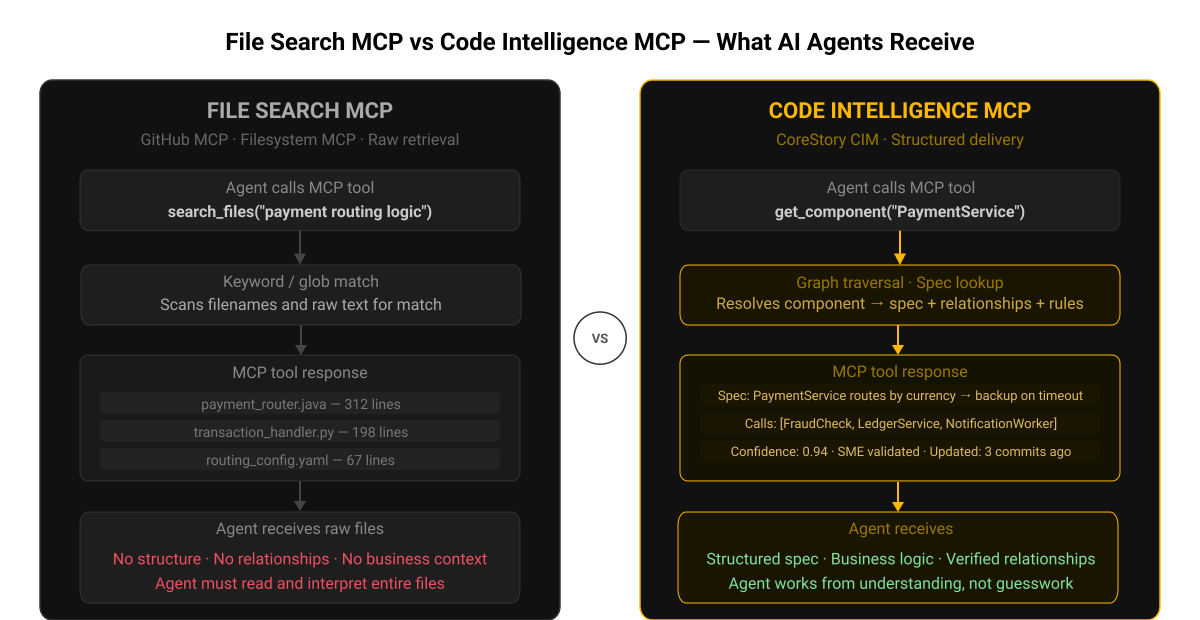
The distinction is critical. Categories 1 and 2 give the agent data and expect the agent to reason about it. Category 3 gives the agent understanding — pre-computed intelligence that the agent can use directly without additional analysis.
CoreStory operates in this category. Its MCP server delivers structured specifications from the Code Intelligence Model: what each component does, how services connect, what business rules are embedded in the code, and how changes propagate through the system. The agent receives architecture-level understanding, not raw code.
Comparison: What Each Category Delivers
How a Code Intelligence MCP Server Works
To understand why code intelligence MCP servers deliver different results, it helps to see what happens under the hood.
When an agent using a file search MCP server asks “how does authentication work?”, the server runs grep or a file listing and returns files containing the word “auth.” The agent gets raw text and must figure out the architecture itself.
When an agent using a semantic search MCP server asks the same question, the server performs an embedding-based search or graph traversal and returns the most relevant code chunks or graph nodes. The agent gets better-targeted results but still needs to synthesize understanding from code fragments.
When an agent using CoreStory’s code intelligence MCP server asks the same question, it receives structured output: the authentication service’s specification, its dependencies on the session manager and token validator, the business rules governing token expiry and refresh logic, and the cross-service call chain from HTTP request through middleware to database. The agent receives the answer, not the raw material to construct an answer.
Setting Up a Code Intelligence MCP Server
MCP server setup follows a common pattern regardless of the server type. Every MCP-compatible host (Claude Code, Cursor, VS Code, Codex) uses a configuration file that specifies which servers to connect to.
For local MCP servers, the configuration typically lives in a project-level .mcp.json file or a global settings file. Each entry specifies the server command, arguments, and any required environment variables. Remote MCP servers use HTTP-based transport instead of the local stdio approach.
Open-source code MCP servers like Code Pathfinder, GitNexus, and KiroGraph run locally and index your codebase on your machine. This keeps your code local, but the trade-off is that local servers are limited to the languages and scale their parsers support.
CoreStory’s MCP server connects to the Code Intelligence Model, which runs on CoreStory’s infrastructure. The agent queries the MCP server, which returns structured specifications from the pre-built intelligence model. Setup requires ingesting your codebase into CoreStory first, after which the MCP server provides immediate access to the full Code Intelligence Model.
Why the MCP Standard Changes the Game for Code Intelligence
Before MCP, code intelligence tools were locked into specific delivery channels. You had to use a particular IDE extension or a specific web interface. If your team used Cursor but the intelligence tool only had a VS Code plugin, you were out of luck.
MCP eliminates that constraint. Any code intelligence system that implements an MCP server is instantly accessible from any MCP-compatible host. This is why MCP coverage in the code intelligence space has exploded: GitNexus, Code Pathfinder, KiroGraph, Graphify, Code Grapher, Nella, Qodo, Sourcegraph, and CoreStory all provide MCP servers.
For enterprise teams, this means choosing a code intelligence platform is no longer a lock-in decision about which IDE or agent to use. The intelligence layer is decoupled from the consumption layer. Your architects can query CoreStory through Claude Code while your developers use Cursor — same intelligence model, different interfaces, unified by MCP.
The protocol’s 2026 roadmap focuses on production readiness: authentication, gateway patterns, audit logging, and streaming responses. As these enterprise features land, MCP-based code intelligence becomes viable for regulated industries where security and compliance are non-negotiable.
CoreStory’s MCP Implementation
CoreStory’s MCP server is the delivery layer for the Code Intelligence Model. When an agent connects to it, the server exposes tools that let the agent query:
- Component specifications: what each module, service, or class does, its responsibilities, and its public interface.
- Architecture relationships: how services connect, what the call chains look like, where data flows between components.
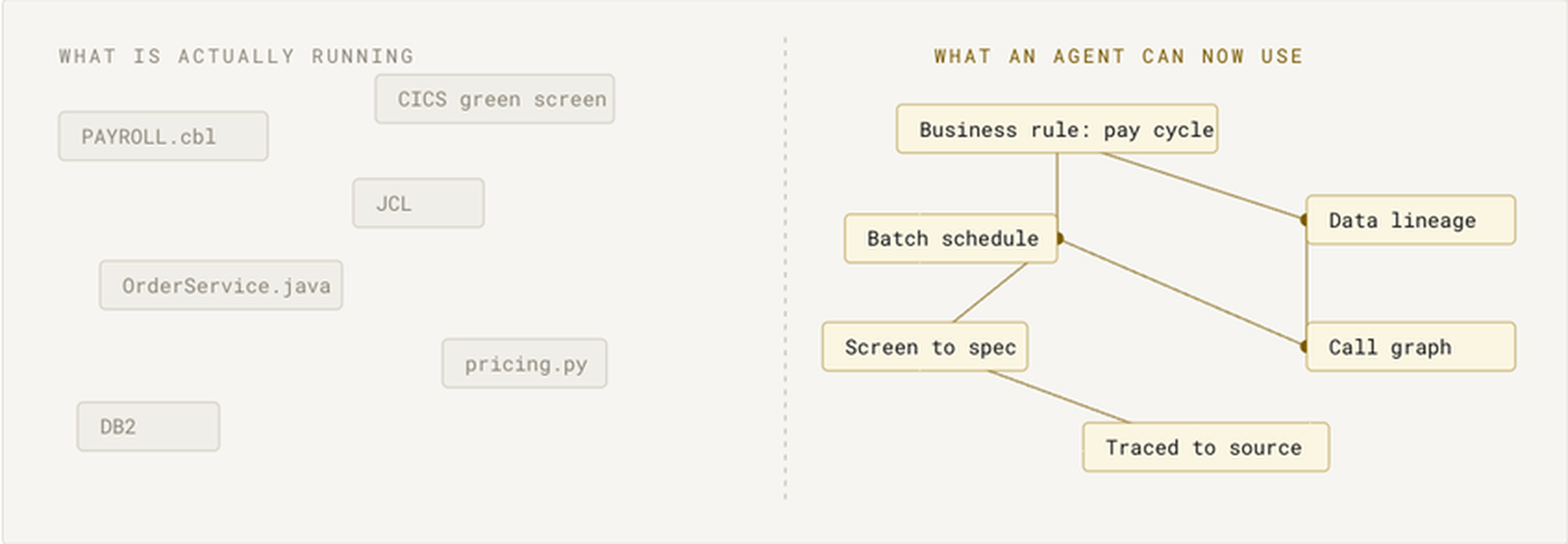
- Business rules: the logic embedded in code, extracted and structured — including from legacy languages like COBOL that most tools can’t parse.
- Change impact: what specifications are affected when a particular file or function changes.
- Search across the entire intelligence model: find components by function, by technology, or by business domain.
The critical difference is that CoreStory’s MCP server delivers intelligence derived from analysis, not raw code retrieved by search. The MCP server makes that entire intelligence model queryable by any compatible AI agent.
Because CoreStory supports a wide range of programming languages, the MCP server provides a unified intelligence layer even for polyglot enterprise systems. An agent can query the architecture of a system that spans Java microservices, a Python data pipeline, and a COBOL mainframe … all through a single MCP connection.
Give Your Agents Real Code Intelligence
MCP solved the integration problem. The question now is what intelligence you push through the protocol.
File search MCP servers help agents find code. Semantic search servers help agents find relevant code. CoreStory’s code intelligence MCP server helps agents understand your entire system (architecture, business rules, dependencies, and change impact) through a single, standardized connection.
Connect your codebase to any AI agent with CoreStory’s MCP server. Try it free today →
Frequently Asked Questions
What AI tools support MCP?
As of 2026: Claude Code, Cursor, VS Code with Copilot, OpenAI Codex, Windsurf, Zed, Continue.dev, Cline, and Goose. The Linux Foundation’s Agentic AI Foundation governance ensures the standard remains vendor-neutral.
Do I need to self-host an MCP server?
It depends on the server. Open-source tools like Code Pathfinder and GitNexus run locally. CoreStory offers both cloud and on-premises deployment for enterprise teams with data sovereignty requirements.
Can I use multiple MCP servers at once?
Yes. MCP hosts support multiple simultaneous server connections. A typical setup might combine a GitHub MCP server, a Jira MCP server, and a code intelligence MCP server like CoreStory — each providing different context to the same agent.
How is CoreStory’s MCP server different from Sourcegraph’s?
Sourcegraph’s MCP integration exposes code search and navigation. CoreStory’s MCP server delivers analyzed specifications: architecture maps, business rules, and component descriptions. Sourcegraph finds code; CoreStory explains what the code means. They serve different purposes and can work together.
What is the performance impact?
MCP queries add minimal latency, typically milliseconds for local servers, low hundreds of milliseconds for remote servers. KiroGraph reports up to 90% reduction in overall token usage compared to agents that explore codebases via file reads, because graph-based retrieval is far more targeted than sequential file scanning.