.svg)


Why AI Coding Agents Fail on Large Codebases
Every AI coding agent (Claude Code, Cursor, GitHub Copilot, Codex, Windsurf…) faces the same fundamental constraint: they can only act on what they can see. For a 500-line side project, that’s rarely a problem. The entire codebase fits in a single context window. The agent reads the code, understands the structure, and produces reasonable output.
For a 500,000-line enterprise system spread across dozens of services, the math breaks. Even with million-token context windows now available in production models, you can’t fit an entire enterprise codebase into a prompt. And even if you could, raw source code doesn’t tell the agent why the system was built that way (the architectural decisions, the business rules embedded in legacy logic, the undocumented constraints that only exist in the heads of engineers who left three years ago…)
The result is predictable: hallucinated imports, functions that don’t exist, patterns that contradict the codebase’s established conventions, and “fixes” that break other parts of the system the agent never saw.
This isn’t a model intelligence problem. It’s an infrastructure problem. The agent is smart enough; it just doesn’t have the information it needs.
There are 3 ways to approach this problem. Each takes a different approach and delivers different results.
Tier 1: Static Context Files (AGENTS.md, .cursorrules, and CLAUDE.md)
The first generation of codebase context delivery is the static context file. You write a markdown file, drop it in your repository root, and the agent reads it before doing any work.
The format landscape has consolidated rapidly. In 2025, every tool had its own approach: Claude Code read CLAUDE.md, Cursor read .cursorrules, GitHub Copilot read .github/copilot-instructions.md. By early 2026, the industry converged on AGENTS.md — now an open standard backed by the Linux Foundation, supported by every major AI coding agent, and adopted by tens of thousands of repositories. OpenAI’s Codex reads AGENTS.md files at every level of the directory tree. Apache Airflow and Temporal have adopted the format. At time of writing, the OpenAI repository alone contains 88 AGENTS.md files.
What AGENTS.md does well
Gives agents project-specific instructions: build commands, coding conventions, test runners, and constraints the agent can’t infer from the code alone.
Portable across tools. One file, one format, understood by Claude Code, Codex, Cursor, Copilot, Windsurf, and more.
Low cost to create. A useful AGENTS.md takes 30 minutes to write and immediately improves agent output quality on small-to-medium repositories.
Where it breaks down
A recent ETH Zurich study (AGENTbench, 2026 - source) tested context files rigorously across 138 real-world Python tasks. The findings were nuanced: LLM-generated AGENTS.md files actually reduced task success rates by approximately 3% and increased inference costs by over 20%. Human-written files performed better, but only when limited to non-inferable details — custom tooling, counterintuitive patterns, and project-specific constraints.
The core limitation is structural. AGENTS.md is a flat file. It doesn’t understand your code; it’s a set of instructions that you manually maintain. For a 100-file project, that works. For a 10,000-file enterprise system, you face three problems:
Staleness: The file drifts as the codebase evolves, and there’s no automated way to detect when it becomes inaccurate.
Scale: You can’t describe an entire enterprise architecture in a markdown file without blowing the agent’s context window budget.
Depth: AGENTS.md tells the agent what commands to run and what patterns to follow. It doesn’t tell the agent how the system actually works — call graphs, data flows, component relationships, business rules.
As one practitioner noted: the real value of writing an AGENTS.md is that it forces you to articulate things about your codebase that were previously just in your head. That’s valuable, but it’s documentation, not intelligence.
Tier 2: RAG-Based Context Retrieval (Sourcegraph Cody, Continue.dev, Windsurf)
The second tier moves from static files to dynamic retrieval. Rather than telling the agent everything upfront, RAG systems index your codebase and retrieve relevant code snippets at query time.
How RAG works for code
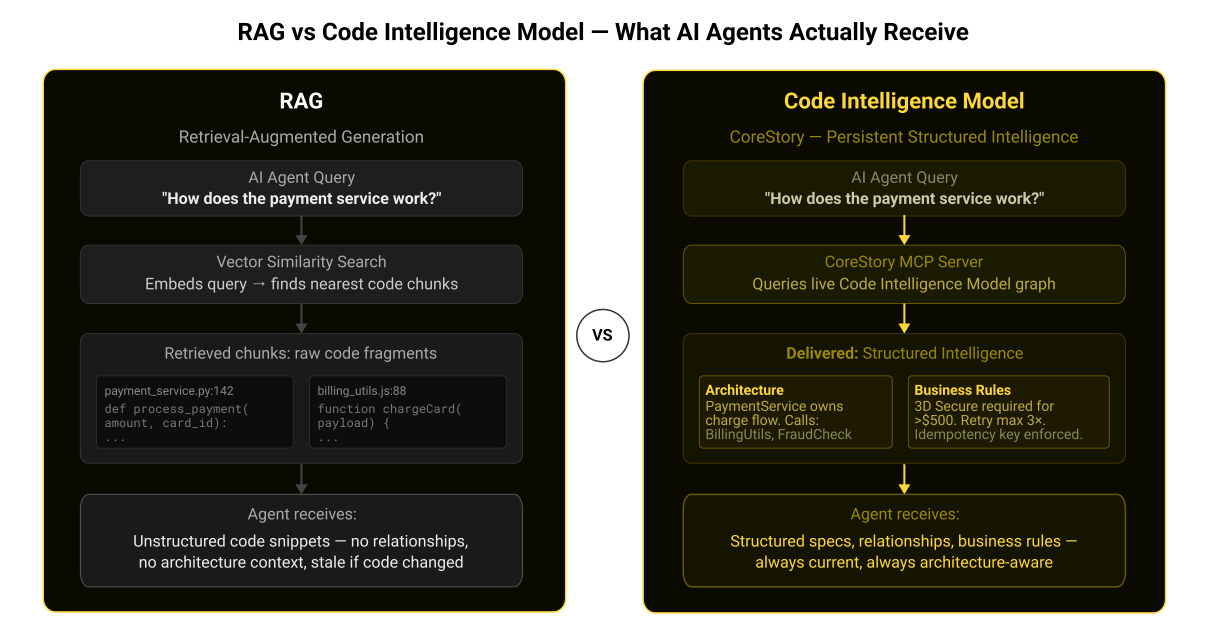
The pipeline is conceptually straightforward: split your codebase into chunks, embed those chunks into a vector space, store them in a vector database, and at query time, find the chunks most semantically similar to the agent’s current task. The retrieved chunks get inserted into the agent’s context window alongside the prompt.
Sourcegraph Cody is the most mature implementation. It combines Sourcegraph’s code search engine (keyword search, SCIP-based code graph, and semantic search) with RAG to provide multi-repository context retrieval. Cody supports context windows up to 1 million tokens and can pull context from up to 10 remote repositories. The architecture gives it strong advantages for teams already using Sourcegraph for code search.
Other notable implementations include Windsurf’s Flow context engine, which uses hybrid semantic + BM25 search with a proprietary M-Query retrieval method; Continue.dev, which provides an open-source framework for building custom code RAG pipelines with MCP integration; and Qodo’s Context Engine, which combines RAG with agentic reasoning for multi-repository intelligence.
Why RAG is better than static files
Dynamic: The agent retrieves what’s relevant to the current task, not a fixed set of instructions.
Scalable: Can index hundreds of thousands of files across multiple repositories.
Current: Re-indexing keeps the retrieval layer in sync with code changes (though update frequency varies - some systems re-index daily, others weekly).
Where RAG falls short
RAG retrieves code. It doesn’t understand code. The distinction matters.
When you ask a RAG system "how does authentication work in this system?", it finds files that are semantically similar to your query, files with words like "auth", "login", "token" in them. That’s useful, but it doesn’t give you the architectural picture of which services are involved, what the call chain looks like, where the business rules live, how the authentication flow interacts with the session management system, or why the team chose this approach over alternatives.
Several teams working on code intelligence at scale have found that AST-based retrieval (following import graphs, type hierarchies, and call chains) outperforms vector similarity for structural code queries. RAG is reactive and unstructured. It responds to what you ask, returning text fragments ranked by similarity but it doesn’t proactively tell the agent things it needs to know but hasn’t thought to ask about.
For many teams, RAG is the right solution. If your codebase is under 500,000 lines and your agents are primarily doing file-level edits and feature additions, RAG-based tools like Cody, Windsurf, or Continue.dev provide a significant improvement over static context files.
Tier 3: Persistent Code Intelligence. From Retrieval to Understanding
The third tier addresses what RAG cannot: structural understanding of how a codebase actually works.
A Code Intelligence Model (CIM) doesn’t just index your code. It analyzes it, parsing abstract syntax trees, extracting call graphs, mapping component relationships, identifying business rules, and building a persistent, queryable model of the entire system. The output isn’t retrieved text fragments, it’s structured specifications: "this service handles payment processing, it depends on these three other services, it implements these business rules, and it was last modified on this date."
The key difference is persistence. Where RAG retrieves on demand and forgets between sessions, a Code Intelligence Model builds understanding that survives turnover, compounds over time, and is accessible to any tool that needs it.
What makes a Code Intelligence Model (CIM) different from RAG
How a Code Intelligence Model Delivers Agent Context
CoreStory is a persistent code intelligence platform purpose-built for enterprise codebases. It ingests your entire repository, regardless of language, framework, or size, and builds a Code Intelligence Model: a knowledge graph of your system that captures architecture, component relationships, business rules, and data flows.
The CIM is delivered to AI coding agents via MCP (Model Context Protocol), the open standard for connecting AI tools to external context sources. When an agent running in Claude Code, Cursor, or any MCP-compatible environment needs to understand part of your system, it queries CoreStory’s MCP server and receives structured specifications. Not raw code, but an analyzed understanding of what the code does and why.
What agents receive from CoreStory
Component specifications: what each module does, its responsibilities, dependencies, and public interfaces.
Architecture maps: how services connect, what the call chains look like, where data flows between components.
Business rule documentation: the logic embedded in code, extracted and structured for human and machine consumption.
Change context: what was recently modified, by whom, and what specifications were affected.
This is the difference between handing a contractor a stack of code printouts and giving them a technical architecture document written by a senior engineer who knows the system inside out.
For one particular production mainframe system, CoreStory extracted 1,984 business specifications from a live COBOL codebase with an 85.5% SME validation rate. That’s not documentation generated from prompts but structured intelligence derived directly from source code analysis and validated by the people who know the system.
How to Evaluate Your Current Approach
Different teams may need different approaches. The right tier depends on your codebase complexity, team size, and what you’re asking agents to do.
Start with AGENTS.md if:
Your codebase is under 100,000 lines and well-structured.
Your agents primarily handle file-level tasks: writing functions, fixing bugs, generating tests.
You have a small team that can manually maintain the context file as the codebase evolves.
You’re using multiple AI coding tools and need a single, portable context format.
Move to RAG-based tools if:
Your codebase spans multiple repositories or exceeds what fits in a context window.
Your agents need to reference code outside the currently open files.
You’re already using Sourcegraph or a similar code search platform.
You need dynamic retrieval — different context for different tasks — rather than a fixed instruction set.
Invest in a Code Intelligence Model if:
Your codebase exceeds 500,000 lines, spans multiple languages, or includes legacy systems.
Your agents need to understand architecture and business logic, not just find relevant files.
You’re planning a modernization, migration, or major refactoring initiative.
Knowledge loss from developer turnover is a real business risk.
You need intelligence that persists across sessions, tools, and team changes.
The tiers are not mutually exclusive. Many enterprise teams use AGENTS.md for project-specific instructions alongside a CIM for structural intelligence. The AGENTS.md handles "run this test command" and "use this naming convention." The CIM handles "here’s how the payment processing pipeline actually works."
Stop Giving Your Agents Workarounds
AGENTS.md was a necessary first step. RAG-based retrieval was a meaningful upgrade. But if your AI coding agents are still guessing about how your system works the problem isn’t the model. It’s the infrastructure.
CoreStory is the persistent code intelligence layer that gives agents what they actually need: a structured, always-current understanding of your entire codebase. Not another prompt engineering trick. Not another configuration file. A production-grade intelligence layer that sits between your code and any agent.
See how CoreStory delivers codebase context to your AI agents. Talk to an expert →
Frequently Asked Questions
Is AGENTS.md still worth using?
Yes. For project-specific instructions (build commands, coding conventions, test runners), AGENTS.md is the best tool available. It’s portable, low-cost, and universally supported. But it’s not a substitute for structural codebase understanding.
Can I use RAG and a Code Intelligence Model together?
Absolutely. RAG excels at finding specific code snippets relevant to a task. A CIM provides the architectural context that tells the agent how those snippets fit into the larger system. They’re complementary.
What languages does CoreStory support?
CoreStory supports a wide range of programming languages, including legacy languages like COBOL and RPG that most AI tools can’t handle well or at all. The Code Intelligence Model is language-agnostic by design.
How does CoreStory deliver context to agents?
Via MCP (Model Context Protocol), the open standard for connecting AI tools to external context. CoreStory’s MCP server works with Claude Code, Cursor, VS Code, and any MCP-compatible agent.