
.svg)


A year ago, "AI developer tools" basically meant one thing: a code autocomplete assistant sitting in your IDE. Today, that's table stakes. The real question isn't whether to use AI in your development workflow — it's which tools go where, how they integrate, and how you keep the output quality high as the velocity increases.
If you're a senior developer or architect building out a team's toolchain, this is the engineering breakdown you actually need.
Layer 1: Code Generation
This is where most teams start, and where the most vendor noise exists. Code generation tools use large language models to suggest, complete, or draft code based on natural language prompts or surrounding context.
Key tools:
- GitHub Copilot — The market leader. While 2023 showed us that individuals code 55.8% faster, 2026 data shows that the ripple effect across teams is even larger: development cycle times have plummeted by 75%, as AI agents now handle everything from the first line of code to the final pull request approval.
- Cursor — A full IDE built around AI, with multi-file editing and codebase-aware prompts. Popular with developers who want deeper AI integration than a plugin provides.
- Claude Code / Codex / Devin — Agentic tools designed to execute multi-step tasks, not just complete lines. Best for well-scoped, bounded tasks where the inputs are clear.
To evaluate each tool, SWE-bench Verified remains the gold standard for agentic software engineering. HumanEval+ scores and LiveCodeBench rankings provide the most contamination-resistant metrics for comparing raw code generation capability. Check them when evaluating, but treat them as a ceiling on isolated-task performance, not a prediction of how a tool will behave on your actual codebase.
However, despite the huge productivity gains, you should be aware of the context window problem: code generation tools have a ceiling that most teams underestimate. Every model has a finite context window, which is the amount of text it can hold in "memory" at once. There are two approaches to working around this:
- Long-context models extend the window significantly, but performance degrades as context fills up. The model can technically see more, but its ability to reason about distant information drops off.
- RAG (Retrieval-Augmented Generation) pulls in relevant snippets at query time rather than stuffing the entire codebase in. This is more targeted, but only as good as the retrieval mechanism, which means understanding what's relevant requires the same system knowledge the model is missing.
Neither approach fully solves the problem on large established codebases with years of accumulated business logic. The model knows code in general, but doesn't understand your system. Layer 2 closes the gap.
Layer 2: Code Intelligence and Grounding
This is the layer most teams skip, and it's the one that unlocks the others.
As mentioned above, code generation tools are only as good as the context they're working with. When an AI agent is trying to modify a payments service in a 500,000-line codebase, it needs to know: "What does this service actually do?", "What are the edge cases?", "What does the surrounding architecture expect from it?" None of that is in the current file.
The tools in this layer don't just index files. They parse and analyze the codebase at the structural level. Under the hood, they typically combine:
- AST (Abstract Syntax Tree) generation to understand code structure beyond text (function signatures, call graphs, dependency trees)
- Metadata extraction to capture business rules, invariants, and architectural patterns embedded in the logic
- Vector embeddings to make the resulting intelligence queryable by semantic similarity, not just keyword match
- Knowledge graph construction to model how components relate to each other across services and boundaries
The output is a persistent, queryable model of how the system works, not a search index or a documentation dump. This is the difference between a map of where things are and an understanding of what they mean.
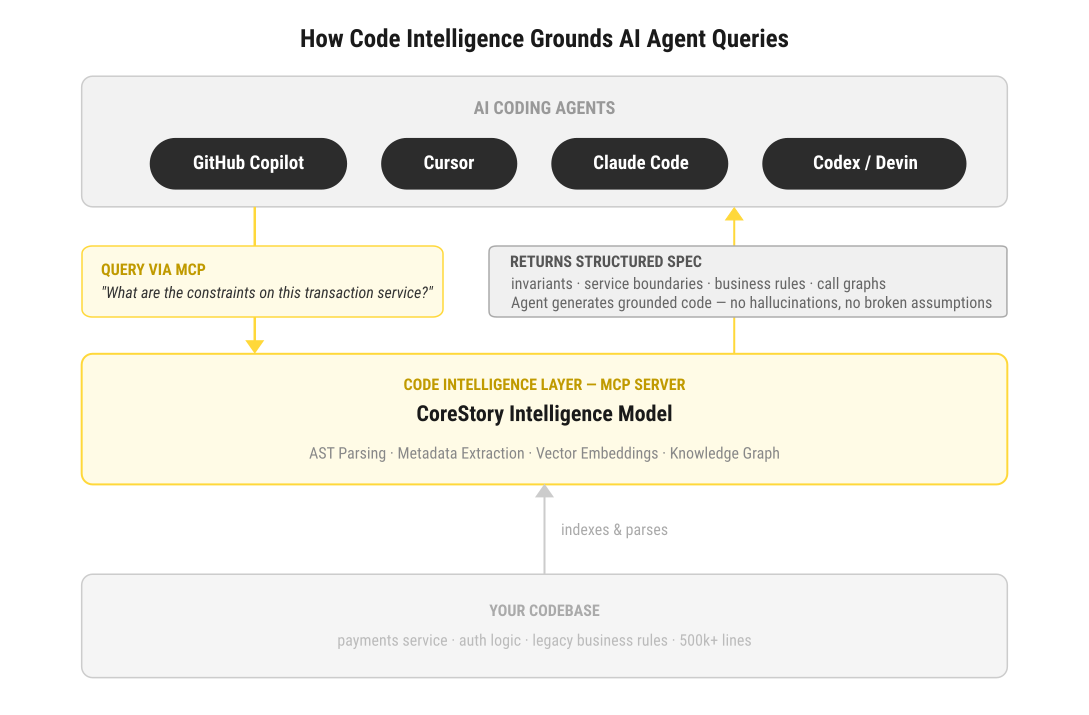
How this integrates with Layer 1 — the MCP connection: The practical integration point between Layer 2 and your IDE is the Model Context Protocol (MCP). MCP is an open protocol that lets AI coding agents query external data sources during task execution. In practice: when Claude Code, Copilot, or Cursor is executing a task, it can issue MCP calls to a code intelligence platform to retrieve system-specific context (component specs, business rules, dependency maps) before generating code. Instead of pattern-matching against training data, the agent is working from an accurate model of your actual system.
Key tools:
- CoreStory — Crawls your repository and builds a persistent intelligence model available via web dashboard (for human exploration and spec review) and MCP/API (for AI coding agents). Designed specifically for large and legacy codebases where the context problem is most severe.
- Sourcegraph Cody — Code search and AI assistance with codebase-wide indexing. Strong for search-driven discovery on large monorepos; the retrieval is keyword and semantic-search based rather than full intelligence modeling.
- Swimm — Documentation that stays synchronized with code changes. Focuses on keeping human-readable context current rather than building a queryable intelligence model.
One key distinction to make: Code intelligence is not a documentation layer and not a code generator. It's the grounding infrastructure that makes everything else work on code that actually exists in the real world, by bringing the architecture's AST, metadata, and relationship graph into the agent's context at the point it's needed. Different tools provide different depth that will yield different results for Layer 1.
Layer 3: Testing
AI-assisted testing is still maturing, but the tools that do exist are legitimately useful, especially for generating test cases and identifying coverage gaps on code that lacks documentation.
Key tools:
- CodiumAI (Qodo) — Generates unit tests and identifies edge cases. Works best when it has accurate context about what the code is supposed to do, which is why it performs better when Layer 2 is in place.
- Diffblue Cover — Automated unit test generation for Java, focused on legacy codebases. One of the few tools built specifically for the brownfield scenario.
- GitHub Copilot (testing mode) — Increasingly capable at generating test stubs and fixture code when prompted correctly.
The mutation testing gap: There's a subtle but important problem with AI-generated tests: they tend to validate what the code currently does, not what it should do. A test suite can give 90% coverage and still be nearly useless if the tests just mirror the implementation without probing its correctness.
Mutation testing tools like Stryker (JavaScript/TypeScript), PIT (Java), and mutmut (Python) address this by deliberately introducing small bugs into the code and checking whether your tests catch them. If a mutant survives, the test suite has a gap. For AI-generated code where the correctness of the implementation itself may be uncertain, mutation testing is a meaningful quality gate that unit coverage alone won't provide.
Where this connects to Layer 2: Test generation tools face the same context problem as code generation tools. Generating a test for a function is straightforward. Generating a test that covers the actual business rule the function is supposed to enforce, and the edge cases that matter in your specific system, requires knowing what that business rule is. That knowledge lives in Layer 2, and makes the difference between tests that simply pass and tests that are actually useful.
Layer 4: CI/CD and Deployment Intelligence
AI is entering the CI/CD pipeline, primarily around two use cases: catching issues before merge and accelerating post-deployment diagnosis.
Key tools:
- LinearB — Engineering metrics and workflow automation, with AI-powered PR review prioritization.
- Harness — AI-assisted deployment pipelines with anomaly detection and automated rollback capabilities.
- GitHub Actions + AI models — Teams are increasingly wiring AI models into custom Actions for automated PR summaries, risk scoring, and deployment gate decisions.
Automated rollbacks in practice: The most concrete version of AI in CI/CD today is metrics-driven automated rollback. A practical implementation: Prometheus monitors key service metrics (error rate, p99 latency, success rate) post-deployment. When metrics cross a defined threshold, a Harness pipeline stage triggers automatically, stopping the rollout and initiating rollback without waiting for a human to catch the regression. The AI component sits in the anomaly detection layer, distinguishing a real degradation from statistical noise. This is not theoretical; teams running this pattern are catching regressions in minutes rather than hours.
The trend to watch: The shift from AI-as-assistant to AI-as-agent in CI/CD. Rather than surfacing information for humans to act on, the next wave of tooling will take automated actions (flagging, blocking, rolling back) based on system understanding. That requires the same grounding as Layer 2, applied at the pipeline level.
The AI Tax: Accounting for the Review Burden
Here's the honest tension in the AI dev stack: if code generation tools help your team produce code faster, you now have a lot more code to review, unit test, security scan, and maintain. The velocity gain is real, but so is the review burden it creates.
This is sometimes called the "AI tax," and it's one of the least-discussed operational realities of high-velocity AI-assisted development. A few ways the stack addresses it:
- Layer 2 (code intelligence) reduces bad output at the source (Layer 1 - Code Generation) by grounding generation in accurate system context. Fewer hallucinations and fewer wrong suggestions means less review time spent on plausible-but-incorrect code.
- Layer 3 (testing) catches correctness issues before they reach review. Automated test generation and mutation testing shift some of the validation burden to tooling.
- Layer 4 (CI/CD gates) provides a final automated check before code reaches production, catching integration failures that slipped through local testing.
None of this eliminates human review. It shifts what humans are reviewing toward genuine architectural and logic decisions, and away from catching basic errors that tooling should have flagged.
Security and Data Governance
Senior developers have legitimate concerns here that go beyond the FAQ boilerplate. The specific questions that matter:
Training data opt-outs: Several major AI coding tools offer enterprise plans with explicit guarantees that your code will not be used to train or improve the underlying model. GitHub Copilot Business and Enterprise, Amazon Q Developer, and others include this in enterprise agreements. Verify this specifically before deploying any tool on proprietary code. The default behavior on free or individual tiers varies by vendor and changes with product updates.
Data residency: Code that passes through AI coding tools may transit vendor infrastructure in any geography unless the enterprise agreement specifies otherwise. For regulated industries or jurisdictions with data residency requirements, confirm where code is processed and stored.
Code intelligence platforms and data handling: For tools that crawl and analyze your entire repository (Layer 2), the data handling question is particularly important as these tools are ingesting your full codebase, not just active files. Review retention policies, access controls, and deletion guarantees before ingestion.
The short version: read the enterprise agreement, not the marketing page. The answers are there if you look for them.
How the Stack Works Together
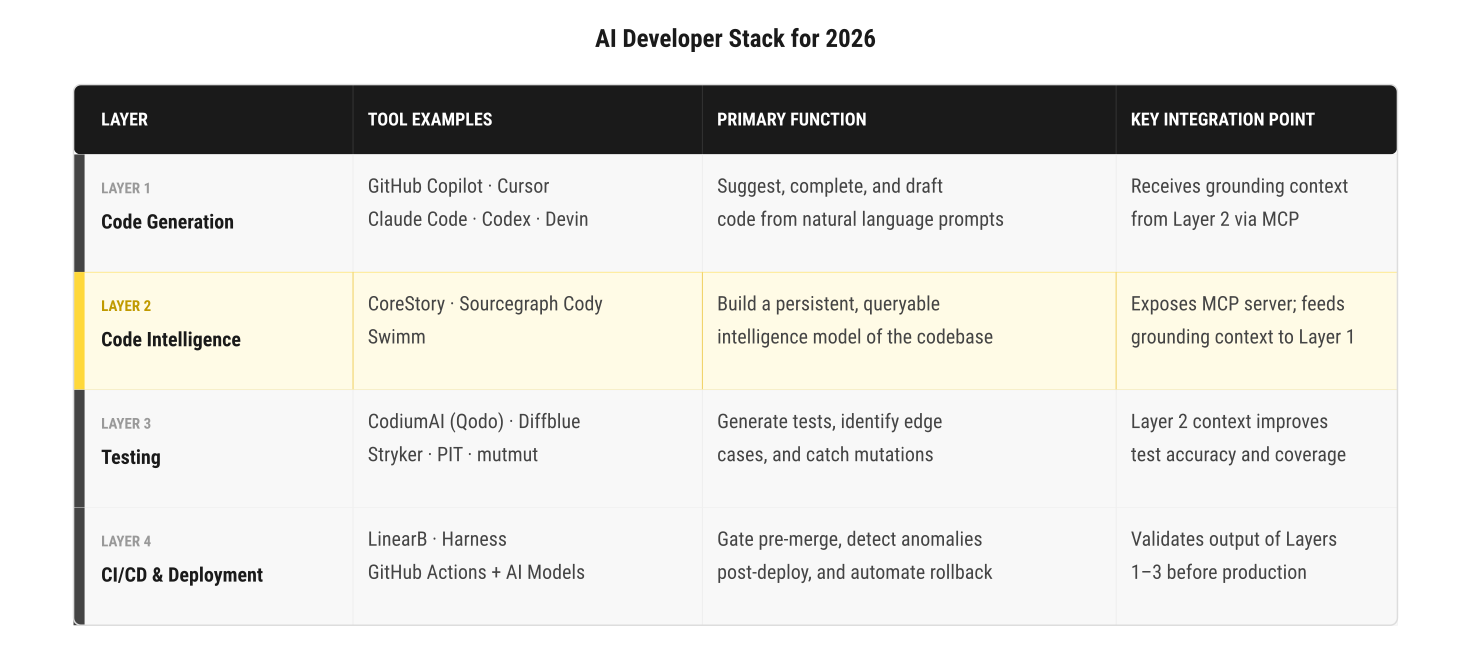
The teams getting the most out of AI-assisted development aren't using a single tool, they're using a stack where each layer feeds into the next.
Code generation tools produce code faster. Code intelligence tools ensure that code is grounded in how the system actually works, understanding its structure with AST and building relationship graphs, all made available to the agent's context via MCP. Testing tools validate the output against real requirements, not just current behavior. CI/CD tools enforce quality gates, automate rollback on regression, and catch what slips through.
Skipping Layer 2 is the most common mistake. Teams add Copilot, see a productivity bump on new code, then run into walls on any task that touches existing business logic. The AI generates plausible-looking code that breaks things in subtle ways, because it didn't understand what it was modifying.
According to the Stack Overflow Developer Survey 2025, the majority of developers are now using or planning to use AI tools in their workflow. The gap between teams that have assembled a real stack and those running a single autocomplete plugin is growing, and so is the gap in code quality and production stability between those two groups.
Choosing Your Stack
A few principles to follow:
- Start with your constraint. If your biggest problem is lack of speed on greenfield work, start with a strong code generation tool. If your biggest problem is safely modifying a complex existing system, start with Layer 2 to understand your code and the impact changes will have. If your output quality is the bottleneck, start with Layer 3 to improve your test abilities and coverage.
- Evaluate on your actual codebase. Benchmark scores from HumanEval and SWE-bench reflect general capability, not performance on your specific code and domain. Run any tool you're seriously evaluating on 10–15 representative tasks from your own backlog and measure both output quality and review time.
- Account for the review burden before you scale. The productivity gain from Layer 1 is real. So is the downstream cost if you add generation velocity without adding the review and validation infrastructure to match it. Before you put your foot on the gas, make sure your guardrails are well set so you don't go off track.
- Don't treat the layers as optional. A team with only Layer 1 delivers more code at a faster pace. A team with Layers 1 through 4 (and an honest accounting of the AI tax) has a genuinely different kind of engineering capacity that truly scales with quality.
Talk to a CoreStory expert to see how persistent code intelligence works on your specific codebase and how you can integrate it via MCP with the tools your team already uses today so you can speed up development with quality.
FAQ
Do I need all four layers?
Not immediately. Start where your constraint is. But the layers are more interdependent than they appear: Layer 2 makes Layer 1 more accurate, and Layer 3 is only as good as the business-rule context that Layer 2 provides. Treat them as a roadmap, not a checklist you must complete before getting value.
How does MCP integration work in practice?
MCP (Model Context Protocol) is an open protocol that lets AI coding agents query external systems during task execution. A code intelligence platform that exposes an MCP server can be queried by any compatible agent (Claude Code, Copilot, and others) at the moment it's planning a code change. The agent issues a structured query; the intelligence layer returns the relevant spec or context; the agent incorporates it before generating code. Setup time varies by platform and agent.
How do code intelligence tools differ from code search?
Code search finds where things are. Code intelligence understands what things mean: the business rules, the architectural decisions, the relationships between components. Code search returns file locations; code intelligence returns a queryable model of system behavior built from AST parsing, metadata extraction, and semantic embeddings.
Are these tools safe for enterprise use?
Security and data handling vary significantly by vendor and tier. Read enterprise agreements carefully for training opt-out terms, data residency guarantees, and retention policies. For code intelligence platforms, understand specifically how your full codebase is stored and who has access to it. This is a non-negotiable evaluation criterion before any deployment.
How fast can these tools be deployed?
Code generation tools (Claude Code, Copilot, Cursor) are IDE plugins, minutes to install. Code intelligence platforms require codebase ingestion, which can take hours to days depending on repository size. Mutation testing frameworks require integration with your existing test runner. Plan Layer 2 and 3 onboarding as project work, not a one-afternoon install.

.png)

.png)